TextView#
Superclasses: Widget, InitiallyUnowned, Object
Implemented Interfaces: Accessible, AccessibleText, Buildable, ConstraintTarget, Scrollable
Displays the contents of a TextBuffer.
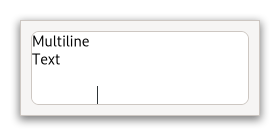
You may wish to begin by reading the conceptual overview, which gives an overview of all the objects and data types related to the text widget and how they work together.
Shortcuts and Gestures#
GtkTextView supports the following keyboard shortcuts:
Shift+:kbd:
F10or Menu opens the context menu.Ctrl+:kbd:
Zundoes the last modification.- Ctrl+:kbd:
Yor Ctrl+:kbd:Shift+:kbd:Z redoes the last undone modification.
- Ctrl+:kbd:
Clear clears the content.
Additionally, the following signals have default keybindings:
Actions#
GtkTextView defines a set of built-in actions:
clipboard.copycopies the contents to the clipboard.clipboard.cutcopies the contents to the clipboard and deletes it from the widget.clipboard.pasteinserts the contents of the clipboard into the widget.menu.popupopens the context menu.misc.insert-emojiopens the Emoji chooser.selection.deletedeletes the current selection.selection.select-allselects all of the widgets content.text.redoredoes the last change to the contents.text.undoundoes the last change to the contents.text.clearclears the content.
CSS nodes#
textview.view
├── border.top
├── border.left
├── text
│   ╰── [selection]
├── border.right
├── border.bottom
╰── [window.popup]
GtkTextView has a main css node with name textview and style class .view,
and subnodes for each of the border windows, and the main text area,
with names border and text, respectively. The border nodes each get
one of the style classes .left, .right, .top or .bottom.
A node representing the selection will appear below the text node.
If a context menu is opened, the window node will appear as a subnode of the main node.
Accessibility#
GtkTextView uses the text_box role.
Constructors#
- class TextView
- classmethod new() Widget#
Creates a new
GtkTextView.If you don’t call
set_bufferbefore using the text view, an empty default buffer will be created for you. Get the buffer withget_buffer. If you want to specify your own buffer, considernew_with_buffer.
- classmethod new_with_buffer(buffer: TextBuffer) Widget#
Creates a new
GtkTextViewwidget displaying the bufferbuffer.One buffer can be shared among many widgets.
buffermay beNoneto create a default buffer, in which case this function is equivalent tonew. The text view adds its own reference count to the buffer; it does not take over an existing reference.- Parameters:
buffer – a
GtkTextBuffer
Methods#
- class TextView
- add_child_at_anchor(child: Widget, anchor: TextChildAnchor) None#
Adds a child widget in the text buffer, at the given
anchor.- Parameters:
child – a
GtkWidgetanchor – a
GtkTextChildAnchorin theGtkTextBufferfortext_view
- add_overlay(child: Widget, xpos: int, ypos: int) None#
Adds
childat a fixed coordinate in theGtkTextView's text window.The
xposandyposmust be in buffer coordinates (seeget_iter_locationto convert to buffer coordinates).childwill scroll with the text view.If instead you want a widget that will not move with the
GtkTextViewcontents seeGtkOverlay.- Parameters:
child – a
GtkWidgetxpos – X position of child in window coordinates
ypos – Y position of child in window coordinates
- backward_display_line(iter: TextIter) bool#
Moves the given
iterbackward by one display (wrapped) line.A display line is different from a paragraph. Paragraphs are separated by newlines or other paragraph separator characters. Display lines are created by line-wrapping a paragraph. If wrapping is turned off, display lines and paragraphs will be the same. Display lines are divided differently for each view, since they depend on the view’s width; paragraphs are the same in all views, since they depend on the contents of the
GtkTextBuffer.- Parameters:
iter – a
GtkTextIter
- backward_display_line_start(iter: TextIter) bool#
Moves the given
iterbackward to the next display line start.A display line is different from a paragraph. Paragraphs are separated by newlines or other paragraph separator characters. Display lines are created by line-wrapping a paragraph. If wrapping is turned off, display lines and paragraphs will be the same. Display lines are divided differently for each view, since they depend on the view’s width; paragraphs are the same in all views, since they depend on the contents of the
GtkTextBuffer.- Parameters:
iter – a
GtkTextIter
- buffer_to_window_coords(win: TextWindowType, buffer_x: int, buffer_y: int) tuple[int, int]#
Converts buffer coordinates to window coordinates.
- Parameters:
win – a
GtkTextWindowTypebuffer_x – buffer x coordinate
buffer_y – buffer y coordinate
- do_delete_from_cursor(self, type: DeleteType, count: int) None#
- Parameters:
type
count
- do_extend_selection(self, granularity: TextExtendSelection, location: TextIter, start: TextIter, end: TextIter) bool#
- Parameters:
granularity
location
start
end
- do_move_cursor(self, step: MovementStep, count: int, extend_selection: bool) None#
- Parameters:
step
count
extend_selection
- do_snapshot_layer(self, layer: TextViewLayer, snapshot: Snapshot) None#
- Parameters:
layer
snapshot
- forward_display_line(iter: TextIter) bool#
Moves the given
iterforward by one display (wrapped) line.A display line is different from a paragraph. Paragraphs are separated by newlines or other paragraph separator characters. Display lines are created by line-wrapping a paragraph. If wrapping is turned off, display lines and paragraphs will be the same. Display lines are divided differently for each view, since they depend on the view’s width; paragraphs are the same in all views, since they depend on the contents of the
GtkTextBuffer.- Parameters:
iter – a
GtkTextIter
- forward_display_line_end(iter: TextIter) bool#
Moves the given
iterforward to the next display line end.A display line is different from a paragraph. Paragraphs are separated by newlines or other paragraph separator characters. Display lines are created by line-wrapping a paragraph. If wrapping is turned off, display lines and paragraphs will be the same. Display lines are divided differently for each view, since they depend on the view’s width; paragraphs are the same in all views, since they depend on the contents of the
GtkTextBuffer.- Parameters:
iter – a
GtkTextIter
- get_accepts_tab() bool#
Returns whether pressing the Tab key inserts a tab characters.
See
set_accepts_tab.
- get_buffer() TextBuffer#
Returns the
GtkTextBufferbeing displayed by this text view.The reference count on the buffer is not incremented; the caller of this function won’t own a new reference.
- get_cursor_locations(iter: TextIter | None = None) tuple[Rectangle, Rectangle]#
Determine the positions of the strong and weak cursors if the insertion point is at
iter.The position of each cursor is stored as a zero-width rectangle. The strong cursor location is the location where characters of the directionality equal to the base direction of the paragraph are inserted. The weak cursor location is the location where characters of the directionality opposite to the base direction of the paragraph are inserted.
If
iterisNone, the actual cursor position is used.Note that if
iterhappens to be the actual cursor position, and there is currently an IM preedit sequence being entered, the returned locations will be adjusted to account for the preedit cursor’s offset within the preedit sequence.The rectangle position is in buffer coordinates; use
buffer_to_window_coordsto convert these coordinates to coordinates for one of the windows in the text view.- Parameters:
iter – a
GtkTextIter
- get_editable() bool#
Returns the default editability of the
GtkTextView.Tags in the buffer may override this setting for some ranges of text.
Gets the menu model that gets added to the context menu or
Noneif none has been set.
- get_gutter(win: TextWindowType) Widget | None#
Gets a
GtkWidgetthat has previously been set as gutter.See
set_gutter.winmust be one ofLEFT,RIGHT,TOP, orBOTTOM.- Parameters:
win – a
GtkTextWindowType
- get_indent() int#
Gets the default indentation of paragraphs in
text_view.Tags in the view’s buffer may override the default. The indentation may be negative.
- get_input_hints() InputHints#
Gets the
input-hintsof theGtkTextView.
- get_input_purpose() InputPurpose#
Gets the
input-purposeof theGtkTextView.
- get_iter_at_location(x: int, y: int) tuple[bool, TextIter]#
Retrieves the iterator at buffer coordinates
xandy.Buffer coordinates are coordinates for the entire buffer, not just the currently-displayed portion. If you have coordinates from an event, you have to convert those to buffer coordinates with
window_to_buffer_coords.- Parameters:
x – x position, in buffer coordinates
y – y position, in buffer coordinates
- get_iter_at_position(x: int, y: int) tuple[bool, TextIter, int]#
Retrieves the iterator pointing to the character at buffer coordinates
xandy.Buffer coordinates are coordinates for the entire buffer, not just the currently-displayed portion. If you have coordinates from an event, you have to convert those to buffer coordinates with
window_to_buffer_coords.Note that this is different from
get_iter_at_location, which returns cursor locations, i.e. positions between characters.- Parameters:
x – x position, in buffer coordinates
y – y position, in buffer coordinates
- get_iter_location(iter: TextIter) Rectangle#
Gets a rectangle which roughly contains the character at
iter.The rectangle position is in buffer coordinates; use
buffer_to_window_coordsto convert these coordinates to coordinates for one of the windows in the text view.- Parameters:
iter – a
GtkTextIter
- get_justification() Justification#
Gets the default justification of paragraphs in
text_view.Tags in the buffer may override the default.
- get_left_margin() int#
Gets the default left margin size of paragraphs in the
text_view.Tags in the buffer may override the default.
- get_line_at_y(y: int) tuple[TextIter, int]#
Gets the
GtkTextIterat the start of the line containing the coordinatey.yis in buffer coordinates, convert from window coordinates withwindow_to_buffer_coords. If non-None,line_topwill be filled with the coordinate of the top edge of the line.- Parameters:
y – a y coordinate
- get_line_yrange(iter: TextIter) tuple[int, int]#
Gets the y coordinate of the top of the line containing
iter, and the height of the line.The coordinate is a buffer coordinate; convert to window coordinates with
buffer_to_window_coords.- Parameters:
iter – a
GtkTextIter
- get_ltr_context() Context#
Gets the
PangoContextthat is used for rendering LTR directed text layouts.The context may be replaced when CSS changes occur.
Added in version 4.4.
- get_pixels_above_lines() int#
Gets the default number of pixels to put above paragraphs.
Adding this function with
get_pixels_below_linesis equal to the line space between each paragraph.
- get_pixels_below_lines() int#
Gets the default number of pixels to put below paragraphs.
The line space is the sum of the value returned by this function and the value returned by
get_pixels_above_lines.
- get_pixels_inside_wrap() int#
Gets the default number of pixels to put between wrapped lines inside a paragraph.
- get_right_margin() int#
Gets the default right margin for text in
text_view.Tags in the buffer may override the default.
- get_rtl_context() Context#
Gets the
PangoContextthat is used for rendering RTL directed text layouts.The context may be replaced when CSS changes occur.
Added in version 4.4.
- get_tabs() TabArray | None#
Gets the default tabs for
text_view.Tags in the buffer may override the defaults. The returned array will be
Noneif “standard” (8-space) tabs are used. Free the return value withfree.
- get_visible_offset() tuple[float | None, float | None]#
Gets the X,Y offset in buffer coordinates of the top-left corner of the textview’s text contents.
This allows for more-precise positioning than what is provided by
get_visible_rectas you can discover what device pixel is being quantized for text positioning.You might want this when making ulterior widgets align with quantized device pixels of the textview contents such as line numbers.
Added in version 4.18.
- get_visible_rect() Rectangle#
Fills
visible_rectwith the currently-visible region of the buffer, in buffer coordinates.Convert to window coordinates with
buffer_to_window_coords.
- im_context_filter_keypress(event: Event) bool#
Allow the
GtkTextViewinput method to internally handle key press and release events.If this function returns
True, then no further processing should be done for this key event. Seefilter_keypress.Note that you are expected to call this function from your handler when overriding key event handling. This is needed in the case when you need to insert your own key handling between the input method and the default key event handling of the
GtkTextView.static gboolean gtk_foo_bar_key_press_event (GtkWidget *widget, GdkEvent *event) { guint keyval; gdk_event_get_keyval ((GdkEvent*)event, &keyval); if (keyval == GDK_KEY_Return || keyval == GDK_KEY_KP_Enter) { if (gtk_text_view_im_context_filter_keypress (GTK_TEXT_VIEW (widget), event)) return TRUE; } // Do some stuff return GTK_WIDGET_CLASS (gtk_foo_bar_parent_class)->key_press_event (widget, event); }
- Parameters:
event – the key event
- move_mark_onscreen(mark: TextMark) bool#
Moves a mark within the buffer so that it’s located within the currently-visible text area.
- Parameters:
mark – a
GtkTextMark
- move_overlay(child: Widget, xpos: int, ypos: int) None#
Updates the position of a child.
See
add_overlay.- Parameters:
child – a widget already added with
add_overlayxpos – new X position in buffer coordinates
ypos – new Y position in buffer coordinates
- move_visually(iter: TextIter, count: int) bool#
Move the iterator a given number of characters visually, treating it as the strong cursor position.
If
countis positive, then the new strong cursor position will becountpositions to the right of the old cursor position. Ifcountis negative then the new strong cursor position will becountpositions to the left of the old cursor position.In the presence of bi-directional text, the correspondence between logical and visual order will depend on the direction of the current run, and there may be jumps when the cursor is moved off of the end of a run.
- Parameters:
iter – a
GtkTextItercount – number of characters to move (negative moves left, positive moves right)
- remove(child: Widget) None#
Removes a child widget from
text_view.- Parameters:
child – the child to remove
- reset_cursor_blink() None#
Ensures that the cursor is shown.
This also resets the time that it will stay blinking (or visible, in case blinking is disabled).
This function should be called in response to user input (e.g. from derived classes that override the textview’s event handlers).
- reset_im_context() None#
Reset the input method context of the text view if needed.
This can be necessary in the case where modifying the buffer would confuse on-going input method behavior.
- scroll_mark_onscreen(mark: TextMark) None#
Scrolls
text_viewthe minimum distance such thatmarkis contained within the visible area of the widget.- Parameters:
mark – a mark in the buffer for
text_view
- scroll_to_iter(iter: TextIter, within_margin: float, use_align: bool, xalign: float, yalign: float) bool#
Scrolls
text_viewso thatiteris on the screen in the position indicated byxalignandyalign.An alignment of 0.0 indicates left or top, 1.0 indicates right or bottom, 0.5 means center. If
use_alignisFalse, the text scrolls the minimal distance to get the mark onscreen, possibly not scrolling at all. The effective screen for purposes of this function is reduced by a margin of sizewithin_margin.Note that this function uses the currently-computed height of the lines in the text buffer. Line heights are computed in an idle handler; so this function may not have the desired effect if it’s called before the height computations. To avoid oddness, consider using
scroll_to_markwhich saves a point to be scrolled to after line validation.- Parameters:
iter – a
GtkTextIterwithin_margin – margin as a [0.0,0.5) fraction of screen size
use_align – whether to use alignment arguments (if
False, just get the mark onscreen)xalign – horizontal alignment of mark within visible area
yalign – vertical alignment of mark within visible area
- scroll_to_mark(mark: TextMark, within_margin: float, use_align: bool, xalign: float, yalign: float) None#
Scrolls
text_viewso thatmarkis on the screen in the position indicated byxalignandyalign.An alignment of 0.0 indicates left or top, 1.0 indicates right or bottom, 0.5 means center. If
use_alignisFalse, the text scrolls the minimal distance to get the mark onscreen, possibly not scrolling at all. The effective screen for purposes of this function is reduced by a margin of sizewithin_margin.- Parameters:
mark – a
GtkTextMarkwithin_margin – margin as a [0.0,0.5) fraction of screen size
use_align – whether to use alignment arguments (if
False, just get the mark onscreen)xalign – horizontal alignment of mark within visible area
yalign – vertical alignment of mark within visible area
- set_accepts_tab(accepts_tab: bool) None#
Sets the behavior of the text widget when the Tab key is pressed.
If
accepts_tabisTrue, a tab character is inserted. Ifaccepts_tabisFalsethe keyboard focus is moved to the next widget in the focus chain.Focus can always be moved using Ctrl+:kbd:
Tab.- Parameters:
accepts_tab –
Trueif pressing the Tab key should insert a tab character,False, if pressing the Tab key should move the keyboard focus.
- set_bottom_margin(bottom_margin: int) None#
Sets the bottom margin for text in
text_view.Note that this function is confusingly named. In CSS terms, the value set here is padding.
- Parameters:
bottom_margin – bottom margin in pixels
- set_buffer(buffer: TextBuffer | None = None) None#
Sets
bufferas the buffer being displayed bytext_view.The previous buffer displayed by the text view is unreferenced, and a reference is added to
buffer. If you owned a reference tobufferbefore passing it to this function, you must remove that reference yourself;GtkTextViewwill not “adopt” it.- Parameters:
buffer – a
GtkTextBuffer
- set_cursor_visible(setting: bool) None#
Toggles whether the insertion point should be displayed.
A buffer with no editable text probably shouldn’t have a visible cursor, so you may want to turn the cursor off.
Note that this property may be overridden by the
gtk_keynav_use_caretsetting.- Parameters:
setting – whether to show the insertion cursor
- set_editable(setting: bool) None#
Sets the default editability of the
GtkTextView.You can override this default setting with tags in the buffer, using the “editable” attribute of tags.
- Parameters:
setting – whether it’s editable
Sets a menu model to add when constructing the context menu for
text_view.You can pass
Noneto remove a previously set extra menu.- Parameters:
model – a
GMenuModel
- set_gutter(win: TextWindowType, widget: Widget | None = None) None#
Places
widgetinto the gutter specified bywin.winmust be one ofLEFT,RIGHT,TOP, orBOTTOM.- Parameters:
win – a
GtkTextWindowTypewidget – a
GtkWidget
- set_indent(indent: int) None#
Sets the default indentation for paragraphs in
text_view.Tags in the buffer may override the default.
- Parameters:
indent – indentation in pixels
- set_input_hints(hints: InputHints) None#
Sets the
input-hintsof theGtkTextView.The
input-hintsallow input methods to fine-tune their behaviour.- Parameters:
hints – the hints
- set_input_purpose(purpose: InputPurpose) None#
Sets the
input-purposeof theGtkTextView.The
input-purposecan be used by on-screen keyboards and other input methods to adjust their behaviour.- Parameters:
purpose – the purpose
- set_justification(justification: Justification) None#
Sets the default justification of text in
text_view.Tags in the view’s buffer may override the default.
- Parameters:
justification – justification
- set_left_margin(left_margin: int) None#
Sets the default left margin for text in
text_view.Tags in the buffer may override the default.
Note that this function is confusingly named. In CSS terms, the value set here is padding.
- Parameters:
left_margin – left margin in pixels
- set_monospace(monospace: bool) None#
Sets whether the
GtkTextViewshould display text in monospace styling.- Parameters:
monospace –
Trueto request monospace styling
- set_overwrite(overwrite: bool) None#
Changes the
GtkTextViewoverwrite mode.- Parameters:
overwrite –
Trueto turn on overwrite mode,Falseto turn it off
- set_pixels_above_lines(pixels_above_lines: int) None#
Sets the default number of blank pixels above paragraphs in
text_view.Tags in the buffer for
text_viewmay override the defaults.- Parameters:
pixels_above_lines – pixels above paragraphs
- set_pixels_below_lines(pixels_below_lines: int) None#
Sets the default number of pixels of blank space to put below paragraphs in
text_view.May be overridden by tags applied to
text_view’s buffer.- Parameters:
pixels_below_lines – pixels below paragraphs
- set_pixels_inside_wrap(pixels_inside_wrap: int) None#
Sets the default number of pixels of blank space to leave between display/wrapped lines within a paragraph.
May be overridden by tags in
text_view’s buffer.- Parameters:
pixels_inside_wrap – default number of pixels between wrapped lines
- set_right_margin(right_margin: int) None#
Sets the default right margin for text in the text view.
Tags in the buffer may override the default.
Note that this function is confusingly named. In CSS terms, the value set here is padding.
- Parameters:
right_margin – right margin in pixels
- set_tabs(tabs: TabArray) None#
Sets the default tab stops for paragraphs in
text_view.Tags in the buffer may override the default.
- Parameters:
tabs – tabs as a
PangoTabArray
- set_top_margin(top_margin: int) None#
Sets the top margin for text in
text_view.Note that this function is confusingly named. In CSS terms, the value set here is padding.
- Parameters:
top_margin – top margin in pixels
- set_wrap_mode(wrap_mode: WrapMode) None#
Sets the line wrapping for the view.
- Parameters:
wrap_mode – a
GtkWrapMode
- starts_display_line(iter: TextIter) bool#
Determines whether
iteris at the start of a display line.See
forward_display_linefor an explanation of display lines vs. paragraphs.- Parameters:
iter – a
GtkTextIter
Properties#
- class TextView
-
- props.bottom_margin: int#
The bottom margin for text in the text view.
Note that this property is confusingly named. In CSS terms, the value set here is padding, and it is applied in addition to the padding from the theme.
Don’t confuse this property with
margin_bottom.
- props.buffer: TextBuffer#
The buffer which is displayed.
A menu model whose contents will be appended to the context menu.
- props.im_module: str#
Which IM (input method) module should be used for this text_view.
See
IMMulticontext.Setting this to a non-
Nonevalue overrides the system-wide IM module setting. See the GtkSettingsgtk_im_moduleproperty.
- props.indent: int#
Amount to indent the paragraph, in pixels.
A negative value of indent will produce a hanging indentation. That is, the first line will have the full width, and subsequent lines will be indented by the absolute value of indent.
- props.input_hints: InputHints#
Additional hints (beyond
input_purpose) that allow input methods to fine-tune their behaviour.
- props.input_purpose: InputPurpose#
The purpose of this text field.
This property can be used by on-screen keyboards and other input methods to adjust their behaviour.
- props.justification: Justification#
Left, right, or center justification.
- props.left_margin: int#
The default left margin for text in the text view.
Tags in the buffer may override the default.
Note that this property is confusingly named. In CSS terms, the value set here is padding, and it is applied in addition to the padding from the theme.
- props.monospace: bool#
Whether text should be displayed in a monospace font.
If
True, set the .monospace style class on the text view to indicate that a monospace font is desired.
- props.right_margin: int#
The default right margin for text in the text view.
Tags in the buffer may override the default.
Note that this property is confusingly named. In CSS terms, the value set here is padding, and it is applied in addition to the padding from the theme.
- props.top_margin: int#
The top margin for text in the text view.
Note that this property is confusingly named. In CSS terms, the value set here is padding, and it is applied in addition to the padding from the theme.
Don’t confuse this property with
margin_top.
Signals#
- class TextView.signals
- backspace() None#
Gets emitted when the user asks for it.
The ::backspace signal is a keybinding signal.
The default bindings for this signal are Backspace and Shift+:kbd:
Backspace.
- copy_clipboard() None#
Gets emitted to copy the selection to the clipboard.
The ::copy-clipboard signal is a keybinding signal.
The default bindings for this signal are Ctrl+:kbd:
cand Ctrl+:kbd:Insert.
- cut_clipboard() None#
Gets emitted to cut the selection to the clipboard.
The ::cut-clipboard signal is a keybinding signal.
The default bindings for this signal are Ctrl+:kbd:
xand Shift+:kbd:Delete.
- delete_from_cursor(type: DeleteType, count: int) None#
Gets emitted when the user initiates a text deletion.
The ::delete-from-cursor signal is a keybinding signal.
If the
typeisCHARS, GTK deletes the selection if there is one, otherwise it deletes the requested number of characters.The default bindings for this signal are Delete for deleting a character, Ctrl+:kbd:
Deletefor deleting a word and Ctrl+:kbd:Backspacefor deleting a word backwards.- Parameters:
type – the granularity of the deletion, as a
GtkDeleteTypecount – the number of
typeunits to delete
- extend_selection(granularity: TextExtendSelection, location: TextIter, start: TextIter, end: TextIter) bool#
Emitted when the selection needs to be extended at
location.- Parameters:
granularity – the granularity type
location – the location where to extend the selection
start – where the selection should start
end – where the selection should end
- insert_at_cursor(string: str) None#
Gets emitted when the user initiates the insertion of a fixed string at the cursor.
The ::insert-at-cursor signal is a keybinding signal.
This signal has no default bindings.
- Parameters:
string – the string to insert
- insert_emoji() None#
Gets emitted to present the Emoji chooser for the
text_view.The ::insert-emoji signal is a keybinding signal.
The default bindings for this signal are Ctrl+<kbd>.</kbd> and Ctrl+<kbd>;</kbd>
- move_cursor(step: MovementStep, count: int, extend_selection: bool) None#
Gets emitted when the user initiates a cursor movement.
The ::move-cursor signal is a keybinding signal. If the cursor is not visible in
text_view, this signal causes the viewport to be moved instead.Applications should not connect to it, but may emit it with
signal_emit_by_name()if they need to control the cursor programmatically.The default bindings for this signal come in two variants, the variant with the Shift modifier extends the selection, the variant without it does not. There are too many key combinations to list them all here.
←, →, ↑, ↓ move by individual characters/lines
Ctrl+:kbd:
←, etc. move by words/paragraphsHome and End move to the ends of the buffer
PgUp and PgDn move vertically by pages
Ctrl+:kbd:
PgUpand Ctrl+:kbd:PgDnmove horizontally by pages
- Parameters:
step – the granularity of the move, as a
GtkMovementStepcount – the number of
stepunits to moveextend_selection –
Trueif the move should extend the selection
- move_viewport(step: ScrollStep, count: int) None#
Gets emitted to move the viewport.
The ::move-viewport signal is a keybinding signal, which can be bound to key combinations to allow the user to move the viewport, i.e. change what part of the text view is visible in a containing scrolled window.
There are no default bindings for this signal.
- Parameters:
step – the granularity of the movement, as a
GtkScrollStepcount – the number of
stepunits to move
- paste_clipboard() None#
Gets emitted to paste the contents of the clipboard into the text view.
The ::paste-clipboard signal is a keybinding signal.
The default bindings for this signal are Ctrl+:kbd:
vand Shift+:kbd:Insert.
- preedit_changed(preedit: str) None#
Emitted when preedit text of the active IM changes.
If an input method is used, the typed text will not immediately be committed to the buffer. So if you are interested in the text, connect to this signal.
This signal is only emitted if the text at the given position is actually editable.
- Parameters:
preedit – the current preedit string
- select_all(select: bool) None#
Gets emitted to select or unselect the complete contents of the text view.
The ::select-all signal is a keybinding signal.
The default bindings for this signal are Ctrl+:kbd:
aand Ctrl+<kbd>/</kbd> for selecting and Shift+:kbd:Ctrl+:kbd:aand Ctrl+<kbd></kbd> for unselecting.- Parameters:
select –
Trueto select,Falseto unselect
- set_anchor() None#
Gets emitted when the user initiates settings the “anchor” mark.
The ::set-anchor signal is a keybinding signal which gets emitted when the user initiates setting the “anchor” mark. The “anchor” mark gets placed at the same position as the “insert” mark.
This signal has no default bindings.
- toggle_cursor_visible() None#
Gets emitted to toggle the
cursor-visibleproperty.The ::toggle-cursor-visible signal is a keybinding signal.
The default binding for this signal is F7.
- toggle_overwrite() None#
Gets emitted to toggle the overwrite mode of the text view.
The ::toggle-overwrite signal is a keybinding signal.
The default binding for this signal is Insert.
Virtual Methods#
- class TextView
-
- do_delete_from_cursor(type: DeleteType, count: int) None#
The class handler for the
GtkTextView::delete-from-cursorkeybinding signal.- Parameters:
type
count
- do_extend_selection(granularity: TextExtendSelection, location: TextIter, start: TextIter, end: TextIter) bool#
The class handler for the
GtkTextView::extend-selectionsignal.- Parameters:
granularity
location
start
end
- do_insert_at_cursor(str: str) None#
The class handler for the
GtkTextView::insert-at-cursorkeybinding signal.- Parameters:
str
- do_move_cursor(step: MovementStep, count: int, extend_selection: bool) None#
The class handler for the
GtkTextView::move-cursorkeybinding signal.- Parameters:
step
count
extend_selection
- do_paste_clipboard() None#
The class handler for the
GtkTextView::paste-clipboardkeybinding signal.
- do_snapshot_layer(layer: TextViewLayer, snapshot: Snapshot) None#
The snapshot_layer vfunc is called before and after the text view is drawing its own text. Applications can override this vfunc in a subclass to draw customized content underneath or above the text. In the
BELOW_TEXTandABOVE_TEXTlayers the drawing is done in the buffer coordinate space.- Parameters:
layer
snapshot