SearchEntry#
Superclasses: Widget, InitiallyUnowned, Object
Implemented Interfaces: Accessible, Buildable, ConstraintTarget, Editable
A single-line text entry widget for use as a search entry.
The main API for interacting with a GtkSearchEntry as entry
is the GtkEditable interface.
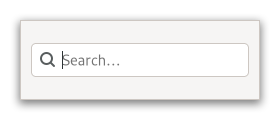
It will show an inactive symbolic “find” icon when the search entry is empty, and a symbolic “clear” icon when there is text. Clicking on the “clear” icon will empty the search entry.
To make filtering appear more reactive, it is a good idea to
not react to every change in the entry text immediately, but
only after a short delay. To support this, GtkSearchEntry
emits the search_changed signal which
can be used instead of the changed signal.
The previous_match,
next_match and
stop_search signals can be used to
implement moving between search results and ending the search.
Often, GtkSearchEntry will be fed events by means of being
placed inside a SearchBar. If that is not the case,
you can use set_key_capture_widget to
let it capture key input from another widget.
GtkSearchEntry provides only minimal API and should be used with
the Editable API.
Shortcuts and Gestures#
The following signals have default keybindings:
CSS Nodes#
entry.search
╰── text
GtkSearchEntry has a single CSS node with name entry that carries
a .search style class, and the text node is a child of that.
Accessibility#
GtkSearchEntry uses the search_box role.
Constructors#
Methods#
- class SearchEntry
- get_input_hints() InputHints#
Gets the input purpose for
entry.Added in version 4.14.
- get_input_purpose() InputPurpose#
Gets the input purpose of
entry.Added in version 4.14.
- get_placeholder_text() str | None#
Gets the placeholder text associated with
entry.Added in version 4.10.
- get_search_delay() int#
Get the delay to be used between the last keypress and the
search_changedsignal being emitted.Added in version 4.8.
- set_input_hints(hints: InputHints) None#
Sets the input hints for
entry.Added in version 4.14.
- Parameters:
hints – the new input hints
- set_input_purpose(purpose: InputPurpose) None#
Sets the input purpose of
entry.Added in version 4.14.
- Parameters:
purpose – the new input purpose
- set_key_capture_widget(widget: Widget | None = None) None#
Sets
widgetas the widget thatentrywill capture key events from.Key events are consumed by the search entry to start or continue a search.
If the entry is part of a
GtkSearchBar, it is preferable to callset_key_capture_widgetinstead, which will reveal the entry in addition to triggering the search entry.Note that despite the name of this function, the events are only ‘captured’ in the bubble phase, which means that editable child widgets of
widgetwill receive text input before it gets captured. If that is not desired, you can capture and forward the events yourself withforward.- Parameters:
widget – a
GtkWidget
- set_placeholder_text(text: str | None = None) None#
Sets the placeholder text associated with
entry.Added in version 4.10.
- Parameters:
text – the text to set as a placeholder
- set_search_delay(delay: int) None#
Set the delay to be used between the last keypress and the
search_changedsignal being emitted.Added in version 4.8.
- Parameters:
delay – a delay in milliseconds
Properties#
- class SearchEntry
-
- props.input_hints: InputHints#
The hints about input for the
GtkSearchEntryused to alter the behaviour of input methods.Added in version 4.14.
- props.input_purpose: InputPurpose#
The purpose for the
GtkSearchEntryinput used to alter the behaviour of input methods.Added in version 4.14.
- props.key_capture_widget: Widget#
The widget that the entry will use to capture key events.
Key events are consumed by the search entry to start or continue a search.
Added in version 4.22.
Signals#
- class SearchEntry.signals
- activate() None#
Emitted when the entry is activated.
The keybindings for this signal are all forms of the Enter key.
- next_match() None#
Emitted when the user initiates a move to the next match for the current search string.
This is a keybinding signal.
Applications should connect to it, to implement moving between matches.
The default bindings for this signal is Ctrl+:kbd:
g.
- previous_match() None#
Emitted when the user initiates a move to the previous match for the current search string.
This is a keybinding signal.
Applications should connect to it, to implement moving between matches.
The default bindings for this signal is Ctrl+:kbd:
Shift+:kbd:g.
- search_changed() None#
Emitted with a delay. The length of the delay can be changed with the
search_delayproperty.
- stop_search() None#
Emitted when the user stops a search via keyboard input.
This is a keybinding signal.
Applications should connect to it, to implement hiding the search entry in this case.
The default bindings for this signal is Escape.