FontButton#
Deprecated since version 4.10: Use FontDialogButton instead
Superclasses: Widget, InitiallyUnowned, Object
Implemented Interfaces: Accessible, Buildable, ConstraintTarget, FontChooser
The GtkFontButton allows to open a font chooser dialog to change
the font.
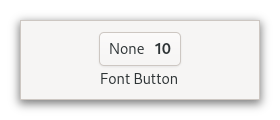
It is suitable widget for selecting a font in a preference dialog.
CSS nodes#
fontbutton
╰── button.font
    ╰── [content]
GtkFontButton has a single CSS node with name fontbutton which
contains a button node with the .font style class.
Constructors#
- class FontButton
- classmethod new() Widget#
Creates a new font picker widget.
Deprecated since version 4.10: Use
FontDialogButtoninstead
- classmethod new_with_font(fontname: str) Widget#
Creates a new font picker widget showing the given font.
Deprecated since version 4.10: Use
FontDialogButtoninstead- Parameters:
fontname – Name of font to display in font chooser dialog
Methods#
- class FontButton
- get_modal() bool#
Gets whether the dialog is modal.
Deprecated since version 4.10: Use
FontDialogButtoninstead
- get_title() str#
Retrieves the title of the font chooser dialog.
Deprecated since version 4.10: Use
FontDialogButtoninstead
- get_use_font() bool#
Returns whether the selected font is used in the label.
Deprecated since version 4.10: Use
FontDialogButtoninstead
- get_use_size() bool#
Returns whether the selected size is used in the label.
Deprecated since version 4.10: Use
FontDialogButtoninstead
- set_modal(modal: bool) None#
Sets whether the dialog should be modal.
Deprecated since version 4.10: Use
FontDialogButtoninstead- Parameters:
modal –
Trueto make the dialog modal
- set_title(title: str) None#
Sets the title for the font chooser dialog.
Deprecated since version 4.10: Use
FontDialogButtoninstead- Parameters:
title – a string containing the font chooser dialog title
- set_use_font(use_font: bool) None#
If
use_fontisTrue, the font name will be written using the selected font.Deprecated since version 4.10: Use
FontDialogButtoninstead- Parameters:
use_font – If
True, font name will be written using font chosen.
- set_use_size(use_size: bool) None#
If
use_sizeisTrue, the font name will be written using the selected size.Deprecated since version 4.10: Use
FontDialogButtoninstead- Parameters:
use_size – If
True, font name will be written using the selected size.
Properties#
- class FontButton