CenterBox#
Superclasses: Widget, InitiallyUnowned, Object
Implemented Interfaces: Accessible, Buildable, ConstraintTarget, Orientable
Arranges three children in a row, keeping the middle child centered as well as possible.
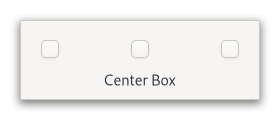
To add children to GtkCenterBox, use set_start_widget,
set_center_widget and
set_end_widget.
The sizing and positioning of children can be influenced with the align and expand properties of the children.
GtkCenterBox as GtkBuildable#
The GtkCenterBox implementation of the GtkBuildable interface
supports placing children in the 3 positions by specifying “start”, “center”
or “end” as the “type” attribute of a <child> element.
CSS nodes#
GtkCenterBox uses a single CSS node with the name “box”,
The first child of the GtkCenterBox will be allocated depending on the
text direction, i.e. in left-to-right layouts it will be allocated on the
left and in right-to-left layouts on the right.
In vertical orientation, the nodes of the children are arranged from top to bottom.
Accessibility#
Until GTK 4.10, GtkCenterBox used the group role.
Starting from GTK 4.12, GtkCenterBox uses the generic
role.
Constructors#
Methods#
- class CenterBox
- get_baseline_position() BaselinePosition#
Gets the baseline position of the center box.
- get_shrink_center_last() bool#
Gets whether the center widget shrinks after other children.
Added in version 4.12.
- set_baseline_position(position: BaselinePosition) None#
Sets the baseline position of a center box.
This affects only horizontal boxes with at least one baseline aligned child. If there is more vertical space available than requested, and the baseline is not allocated by the parent then
positionis used to allocate the baseline with respect to the extra space available.- Parameters:
position – the baseline position
- set_center_widget(child: Widget | None = None) None#
Sets the center widget.
To remove the existing center widget, pass
NULL.- Parameters:
child – the new center widget
- set_end_widget(child: Widget | None = None) None#
Sets the end widget.
To remove the existing end widget, pass
NULL.- Parameters:
child – the new end widget
- set_shrink_center_last(shrink_center_last: bool) None#
Sets whether to shrink the center widget after other children.
By default, when there’s no space to give all three children their natural widths, the start and end widgets start shrinking and the center child keeps natural width until they reach minimum width.
If
shrink_center_lastis false, start and end widgets keep natural width and the center widget starts shrinking instead.Added in version 4.12.
- Parameters:
shrink_center_last – whether to shrink the center widget after others
Properties#
- class CenterBox
- props.baseline_position: BaselinePosition#
The position of the baseline aligned widget if extra space is available.
- props.center_widget: Widget#
The widget that is placed at the center position.
Added in version 4.10.
- props.end_widget: Widget#
The widget that is placed at the end position.
In vertical orientation, the end position is at the bottom. In horizontal orientation, the end position is at the trailing edge with respect to the text direction.
Added in version 4.10.
- props.shrink_center_last: bool#
Whether to shrink the center widget after other children.
By default, when there’s no space to give all three children their natural widths, the start and end widgets start shrinking and the center child keeps natural width until they reach minimum width.
If false, start and end widgets keep natural width and the center widget starts shrinking instead.
Added in version 4.12.