HeaderBar#
Superclasses: Widget, InitiallyUnowned, Object
Implemented Interfaces: Accessible, Buildable, ConstraintTarget
Creates a custom titlebar for a window.
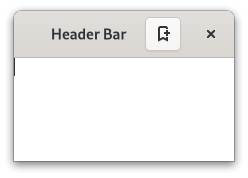
GtkHeaderBar is similar to a horizontal GtkCenterBox. It allows
children to be placed at the start or the end. In addition, it allows
the window title to be displayed. The title will be centered with respect
to the width of the box, even if the children at either side take up
different amounts of space.
GtkHeaderBar can add typical window frame controls, such as minimize,
maximize and close buttons, or the window icon.
For these reasons, GtkHeaderBar is the natural choice for use as the
custom titlebar widget of a GtkWindow (see set_titlebar),
as it gives features typical of titlebars while allowing the addition of
child widgets.
GtkHeaderBar as GtkBuildable#
The GtkHeaderBar implementation of the GtkBuildable interface supports
adding children at the start or end sides by specifying “start” or “end” as
the “type” attribute of a <child> element, or setting the title widget by
specifying “title” value.
By default the GtkHeaderBar uses a GtkLabel displaying the title of the
window it is contained in as the title widget, equivalent to the following
UI definition:
<object class="GtkHeaderBar">
  <property name="title-widget">
    <object class="GtkLabel">
      <property name="label" translatable="yes">Label</property>
      <property name="single-line-mode">True</property>
      <property name="ellipsize">end</property>
      <property name="width-chars">5</property>
      <style>
        <class name="title"/>
      </style>
    </object>
  </property>
</object>
CSS nodes#
headerbar
╰── windowhandle
    ╰── box
        ├── box.start
        │   ├── windowcontrols.start
        │   ╰── [other children]
        ├── [Title Widget]
        ╰── box.end
            ├── [other children]
            ╰── windowcontrols.end
A GtkHeaderBar's CSS node is called headerbar. It contains a windowhandle
subnode, which contains a box subnode, which contains two box subnodes at
the start and end of the header bar, as well as a center node that represents
the title.
Each of the boxes contains a windowcontrols subnode, see
WindowControls for details, as well as other children.
Accessibility#
GtkHeaderBar uses the group role.
Constructors#
Methods#
- class HeaderBar
-
- get_show_title_buttons() bool#
Returns whether this header bar shows the standard window title buttons.
- get_title_widget() Widget | None#
Retrieves the title widget of the header bar.
See
set_title_widget.
- get_use_native_controls() bool#
Returns whether this header bar shows platform native window controls.
Added in version 4.18.
- pack_end(child: Widget) None#
Adds a child to the header bar, packed with reference to the end.
- Parameters:
child – the widget to be added to
bar
- pack_start(child: Widget) None#
Adds a child to the header bar, packed with reference to the start.
- Parameters:
child – the widget to be added to
bar
- remove(child: Widget) None#
Removes a child from the header bar.
The child must have been added with
pack_start,pack_endorset_title_widget.- Parameters:
child – the child to remove
- set_decoration_layout(layout: str | None = None) None#
Sets the decoration layout for this header bar.
This property overrides the
gtk_decoration_layoutsetting.There can be valid reasons for overriding the setting, such as a header bar design that does not allow for buttons to take room on the right, or only offers room for a single close button. Split header bars are another example for overriding the setting.
The format of the string is button names, separated by commas. A colon separates the buttons that should appear on the left from those on the right. Recognized button names are minimize, maximize, close and icon (the window icon).
For example, “icon:minimize,maximize,close” specifies an icon on the left, and minimize, maximize and close buttons on the right.
- Parameters:
layout – a decoration layout
- set_show_title_buttons(setting: bool) None#
Sets whether this header bar shows the standard window title buttons.
- Parameters:
setting – true to show standard title buttons
- set_title_widget(title_widget: Widget | None = None) None#
Sets the title for the header bar.
When set to
NULL, the headerbar will display the title of the window it is contained in.The title should help a user identify the current view. To achieve the same style as the builtin title, use the “title” style class.
You should set the title widget to
NULL, for the window title label to be visible again.- Parameters:
title_widget – a widget to use for a title
- set_use_native_controls(setting: bool) None#
Sets whether this header bar shows native window controls.
This option shows the “stoplight” buttons on macOS. For Linux, this option has no effect.
See also Using GTK on Apple macOS.
Added in version 4.18.
- Parameters:
setting – true to show native window controls
Properties#
- class HeaderBar
- props.decoration_layout: str#
The decoration layout for buttons.
If this property is not set, the
gtk_decoration_layoutsetting is used.
- props.show_title_buttons: bool#
Whether to show title buttons like close, minimize, maximize.
Which buttons are actually shown and where is determined by the
decoration_layoutproperty, and by the state of the window (e.g. a close button will not be shown if the window can’t be closed).
- props.use_native_controls: bool#
Whether to show platform native close/minimize/maximize buttons.
For macOS, the
decoration_layoutproperty can be used to enable/disable controls.On Linux, this option has no effect.
See also Using GTK on Apple macOS.
Added in version 4.18.