ViewSwitcherBar#
Superclasses: Widget, InitiallyUnowned, Object
Implemented Interfaces: Accessible, Buildable, ConstraintTarget
A view switcher action bar.
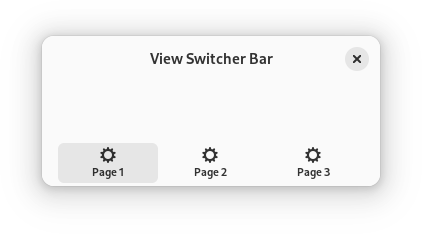
An action bar letting you switch between multiple views contained in a
ViewStack, via an ViewSwitcher. It is designed to be put at
the bottom of a window and to be revealed only on really narrow windows, e.g.
on mobile phones. It can’t be revealed if there are less than two pages.
AdwViewSwitcherBar is intended to be used together with
AdwViewSwitcher in a header bar, and a Breakpoint showing the view
switcher bar on narrow sizes, while removing the view switcher from the
header bar, as follows:
<object class="AdwWindow">
  <child>
    <object class="AdwBreakpoint">
      <condition>max-width: 550sp</condition>
      <setter object="switcher_bar" property="reveal">True</setter>
      <setter object="header_bar" property="title-widget"/>
    </object>
  </child>
  <property name="content">
    <object class="AdwToolbarView">
      <child type="top">
        <object class="AdwHeaderBar" id="header_bar">
          <property name="title-widget">
            <object class="AdwViewSwitcher">
              <property name="stack">stack</property>
              <property name="policy">wide</property>
            </object>
          </property>
        </object>
      </child>
      <property name="content">
        <object class="AdwViewStack" id="stack"/>
      </property>
      <child type="bottom">
        <object class="AdwViewSwitcherBar" id="switcher_bar">
          <property name="stack">stack</property>
        </object>
      </child>
    </object>
  </property>
</object>
It’s recommended to set policy to
wide in this case.
You may have to adjust the breakpoint condition for your specific pages.
CSS nodes#
AdwViewSwitcherBar has a single CSS node with name``viewswitcherbar``.
See also: ViewSwitcher, InlineViewSwitcher,
ViewSwitcherSidebar.